Open your state’s website for filing steps and forms.
Pennsylvania LLC Name Availability
Check your candidates, then use Pennsylvania’s official Business Search to compare the records and statuses behind the wording you plan to file.
Check a business name.
We use a third-party name-check service for this preliminary check. It does not search the official state website directly.
Checking your name.
Checking name availability in your selected state.
Your result
Final name approval is made by the state.
About this check
Enter the phrase before selecting Contains
Pennsylvania’s Business Search accepts a business name or file number. When checking a new candidate, search the distinctive wording and keep the filing type, status and dates open for the first scan.
- Type the candidate phrase first. Open Advanced only after the field contains the wording you want to compare.
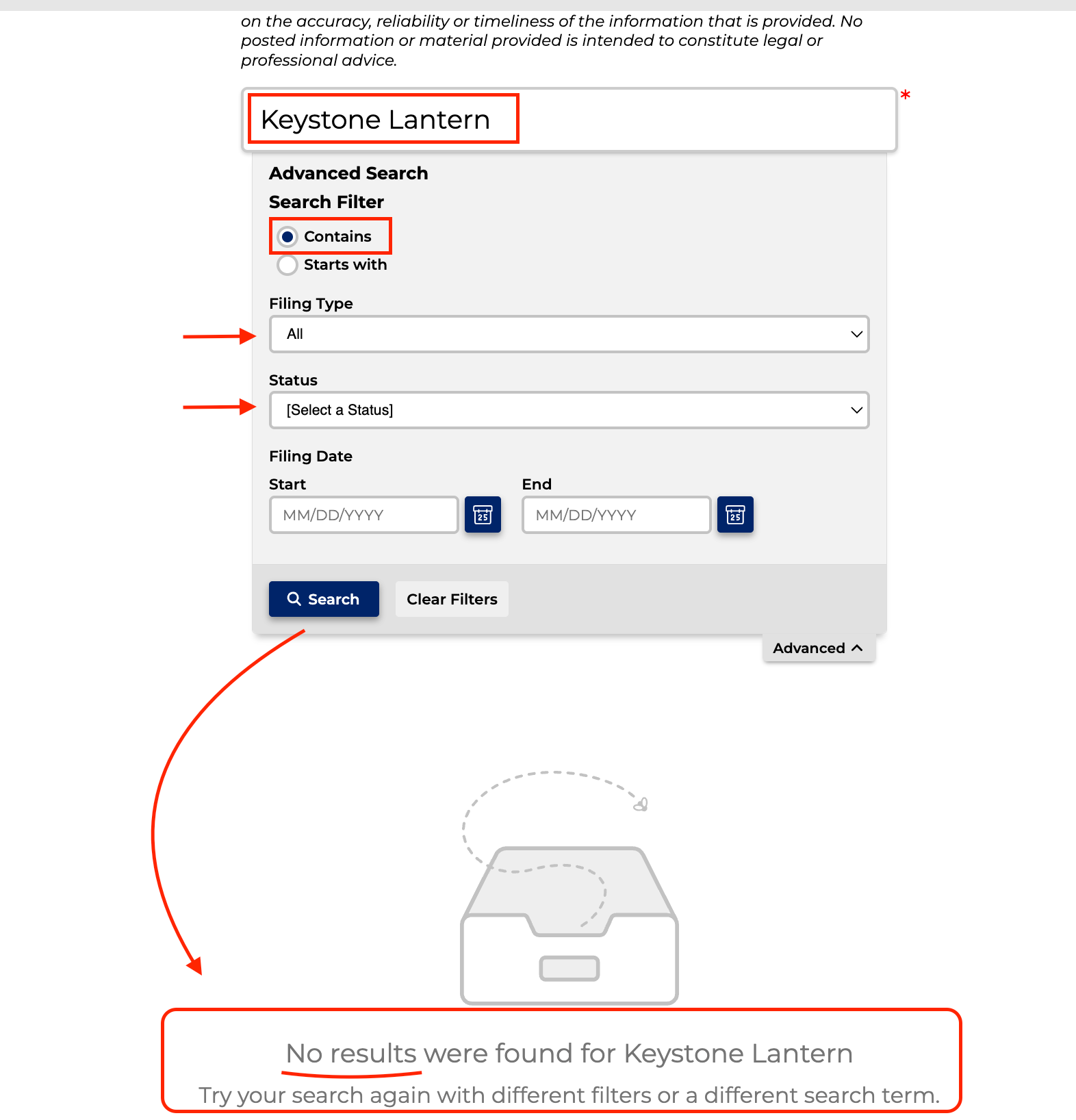
- Select Contains. Leave Filing Type at All, keep Status unselected and leave both filing-date fields blank.
- Submit the search. Before reading the rows or empty state, confirm that the completed view still shows your phrase and Contains.
On September 15, changing the query returned the search method to Starts with. Check the method again after editing your wording so you know which search you are reading.
Open Pennsylvania Business Search
 Open full size
The invented Keystone Lantern query returned no results with those controls. That is a completed search result for the query shown, not a reservation or an approval of the name for filing.
Read the filing type and status beside each close name
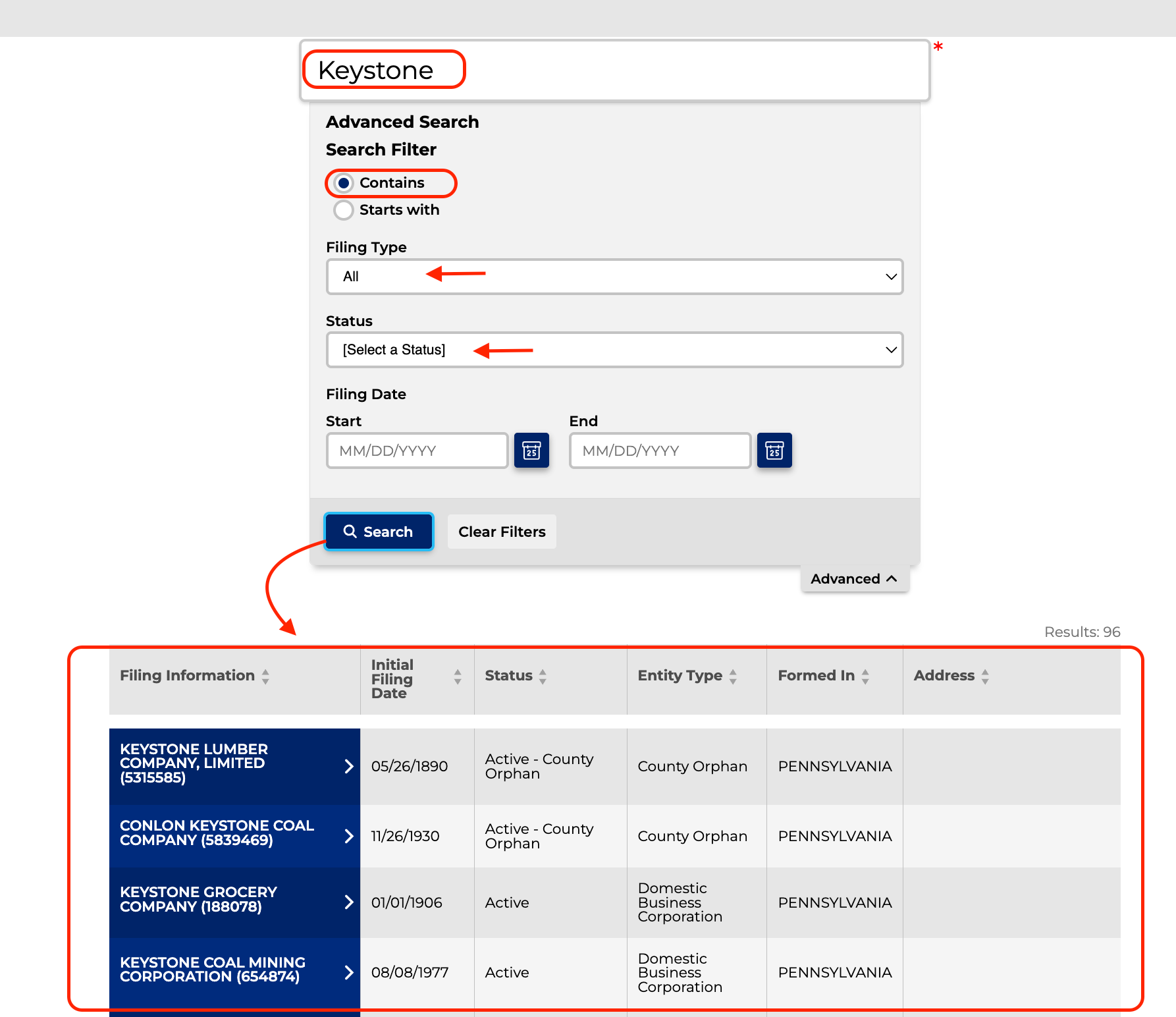
A shorter search can reveal records around your candidate. Keystone returned 96 records in the dated example below. The table separates the filing information, initial filing date, status, entity type and state of formation so you can identify what each row represents.
 Open full size
Keep the file number beside any close record you want to investigate. A corporation, LLC, fictitious name or name reservation is a different kind of filing, and the status describes that record. Neither field by itself decides whether the Department will accept your proposed LLC name.
 Open full size
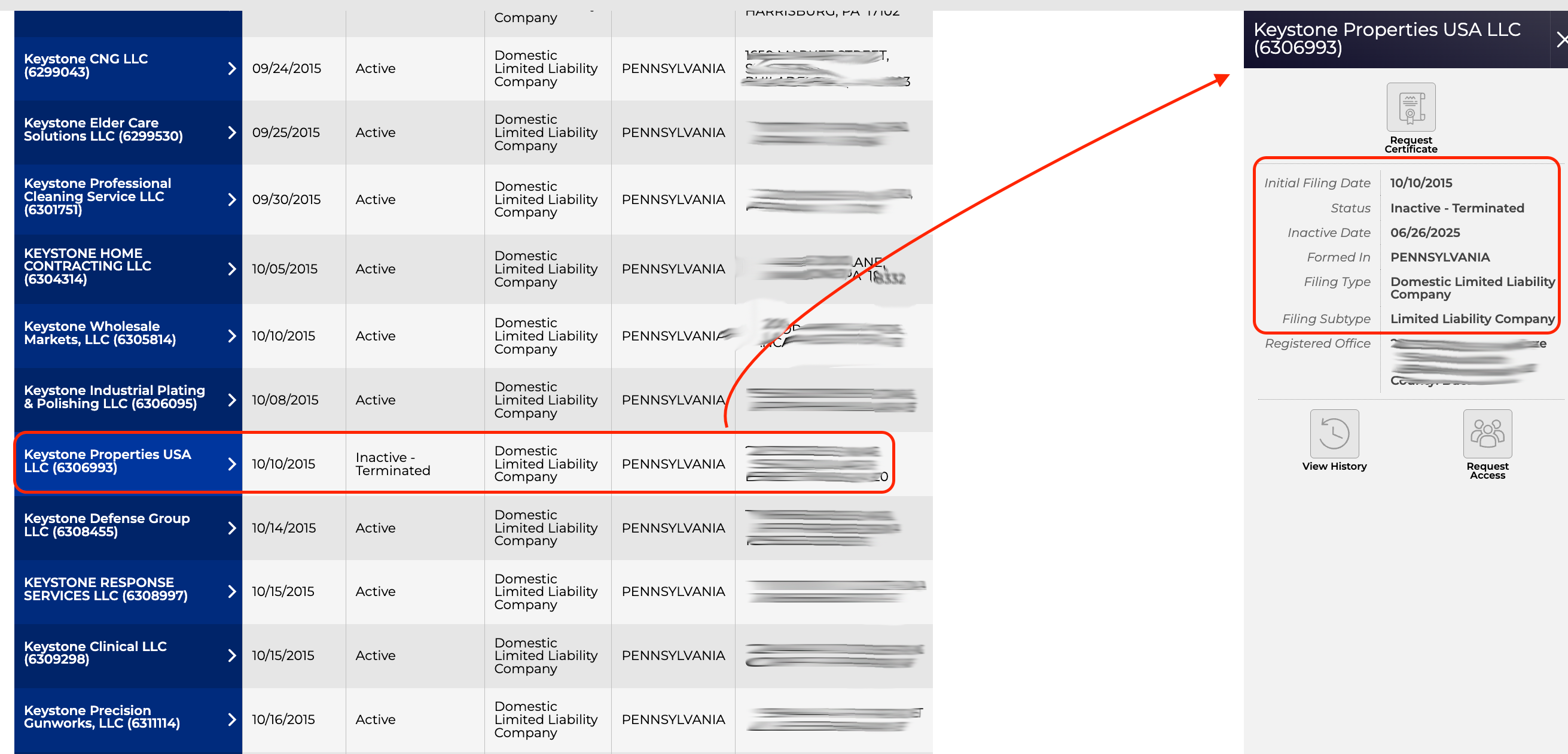
Opening Keystone Properties USA LLC shows an initial filing date of October 10, 2015, an Inactive - Terminated status and an inactive date of June 26, 2025. Those details help you identify the record. Do not infer name clearance from the inactive label.
An old active record may need Department review
The Department’s Name Availability guidance addresses an unusual Pennsylvania problem: some older associations remain active in Bureau records even when they appear to have stopped operating. Their names are not automatically released.
If one of those records appears to block your candidate and consent is unavailable, the Department describes a Name Availability Certificate request. Email RA-CORPS@pa.gov with the subject Name Availability and include the complete association name, file or entity number, and initial filing date. The agency publishes a 7 to 10 day email-response window for that request.
The guidance also describes consent from the existing association and official proof that a registered foreign association abandoned the name in its home jurisdiction. Use the route that matches the particular record; none of these documents gives general advance approval for every proposed name.
Check the complete LLC name and its meaning
15 Pa.C.S. § 202 requires a covered association’s name to be distinguishable in the Department’s records from specified existing, reserved and registered names. Review the full section if a close record appears, because it also describes exceptions and ways an existing association can consent.
The same section places conditions on what a name implies. Government-agency wording and terms associated with banking, insurance, public utilities, credit unions, colleges, universities, seminaries, engineering, surveying, architecture and cooperatives raise separate approval or eligibility questions. The list is tied to how the words are used, so an empty business search does not resolve it.
Section 204(c) requires an ordinary LLC name to contain company, limited, limited liability company, an abbreviation of one of those terms, or a term of like import in another language. In the Naming Desk, choosing an ending changes the filing-name presentation you save or copy. It does not rerun the candidate’s check.
Reserve the name only if you need a 120-day hold
15 Pa.C.S. § 208 gives an accepted name reservation a 120-day exclusive-use period and allows the reservation to be transferred.
The Department’s Reservation or Transfer of Reservation form lists a $70 fee and describes the reservation as one-time. It says the association designator is not required in the reserved name. The form’s address fields become public records, so decide which valid address to provide before submitting it.
The form also warns against establishing signs, business cards, bank accounts or contracts under the requested name before the Department officially accepts the filing. A reservation helps with timing; it is not permission to start using the name in those ways.
Official Pennsylvania references
- Pennsylvania Department of State - Bureau of Corporations and Charitable Organizations: Business Search: controls and example results observed and captured September 15, 2026.
- Name Availability after Act 122: active-record name-release and certificate routes, checked September 15, 2026.
- 15 Pa.C.S. § 202: distinguishability and approval conditions, checked September 15, 2026.
- 15 Pa.C.S. § 204: LLC name form, checked September 15, 2026.
- 15 Pa.C.S. § 208 and the DSCB:15-208 form: reservation period, transfer and form details, checked September 15, 2026.