Open your state’s website for filing steps and forms.
New York LLC Name Availability
Check a candidate, then use New York’s DOS search to examine nearby names and the limits of the returned records.
Check a business name.
We use a third-party name-check service for this preliminary check. It does not search the official state website directly.
Checking your name.
Checking name availability in your selected state.
Your result
Final name approval is made by the state.
About this check
Set both the status and the entity categories
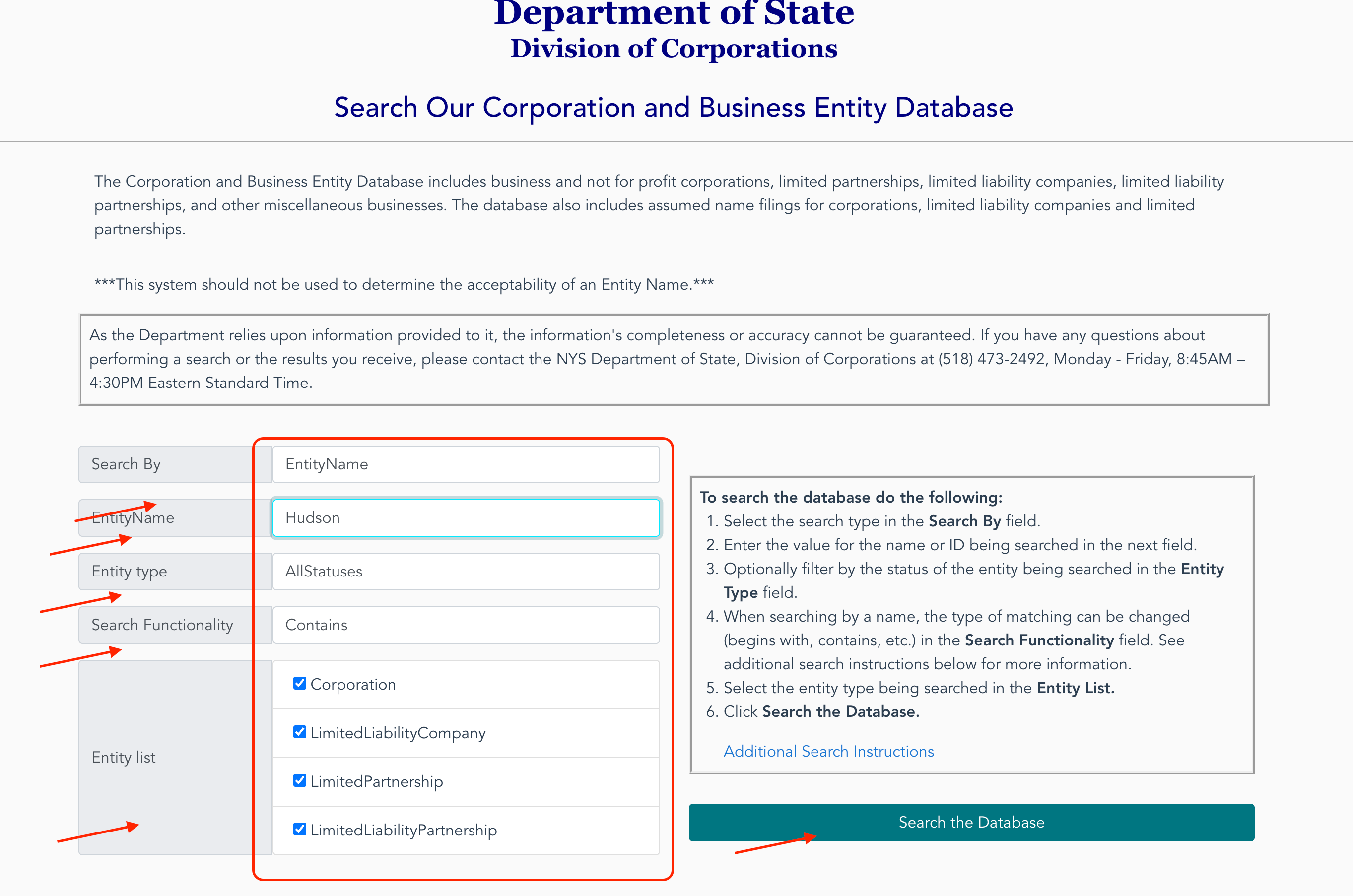
New York’s DOS search has two controls that are easy to confuse. Entity type selects a status, such as Active or AllStatuses. The checkboxes under Entity list select corporations, LLCs and the other listed legal forms.
For a first scan, keep the statuses open and include all four categories. An LLC-only list would leave out corporation and limited-partnership records that New York’s naming rule also considers.
- Open Public Inquiry and leave Search By at EntityName.
- Enter the wording you want to investigate. Choose AllStatuses and Contains.
- Check Corporation, LimitedLiabilityCompany, LimitedPartnership and LimitedLiabilityPartnership, then select Search the Database.
 Open full size
The example uses Hudson. Keep a note of your query and selections before submitting: the result screens below do not display those settings.
A 300-record list needs a narrower search
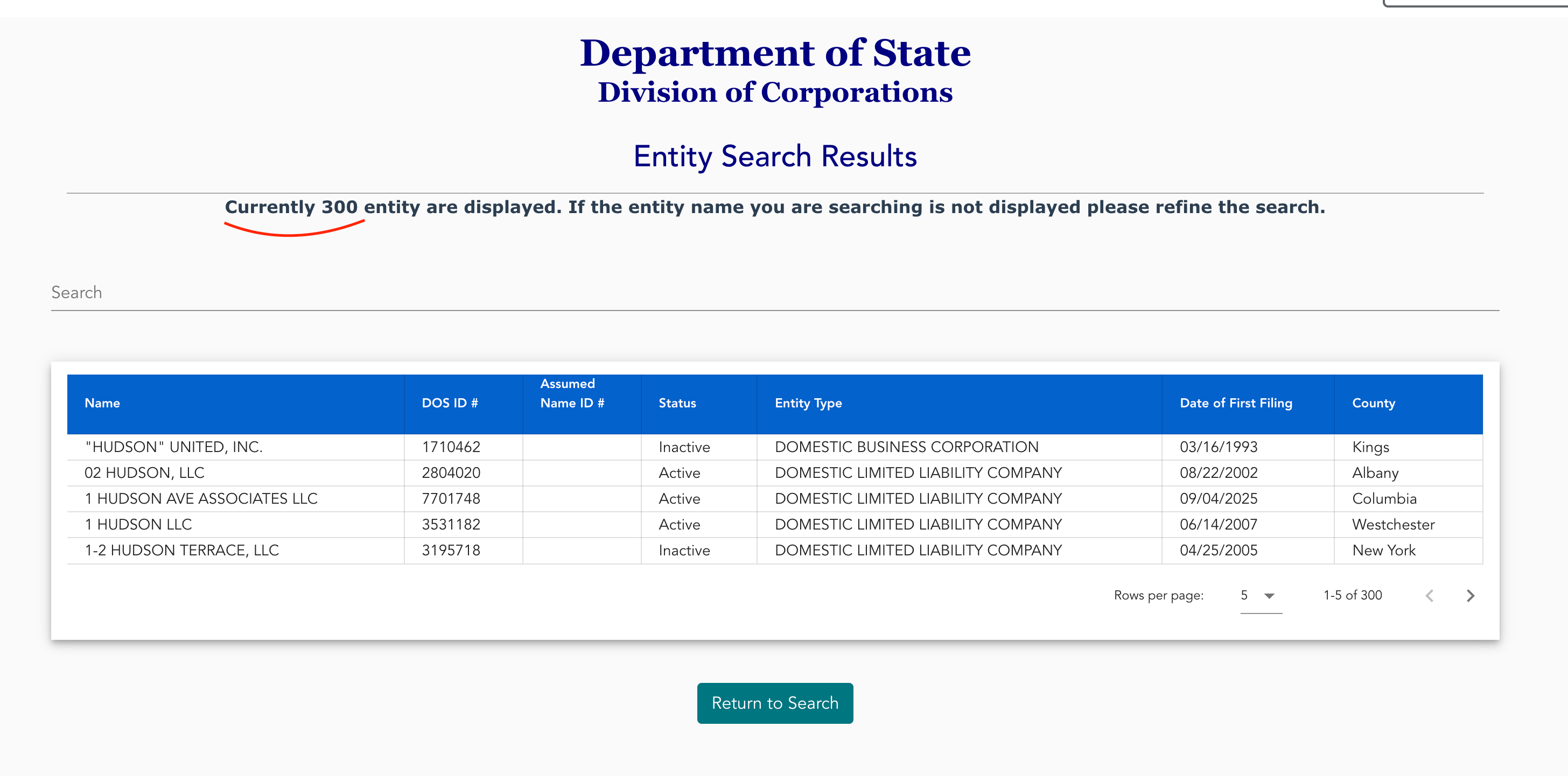
On October 1, the Hudson query displayed 300 records. The notice above the table asked for a refined search if the desired entity was missing. Treat that number as the displayed set, not a count of every possible match.
 Open full size
The first rows include an inactive corporation and active and inactive LLCs. Read Status and Entity Type beside a close name, and keep its DOS ID for another lookup. An inactive label identifies the record’s status; it does not settle whether your proposed name can be filed.
Use Return to Search to try a more specific phrase. In the observed session, that button cleared the name, restored BeginsWith and unchecked every entity category. Enter the next phrase and select Contains and the categories again before searching.
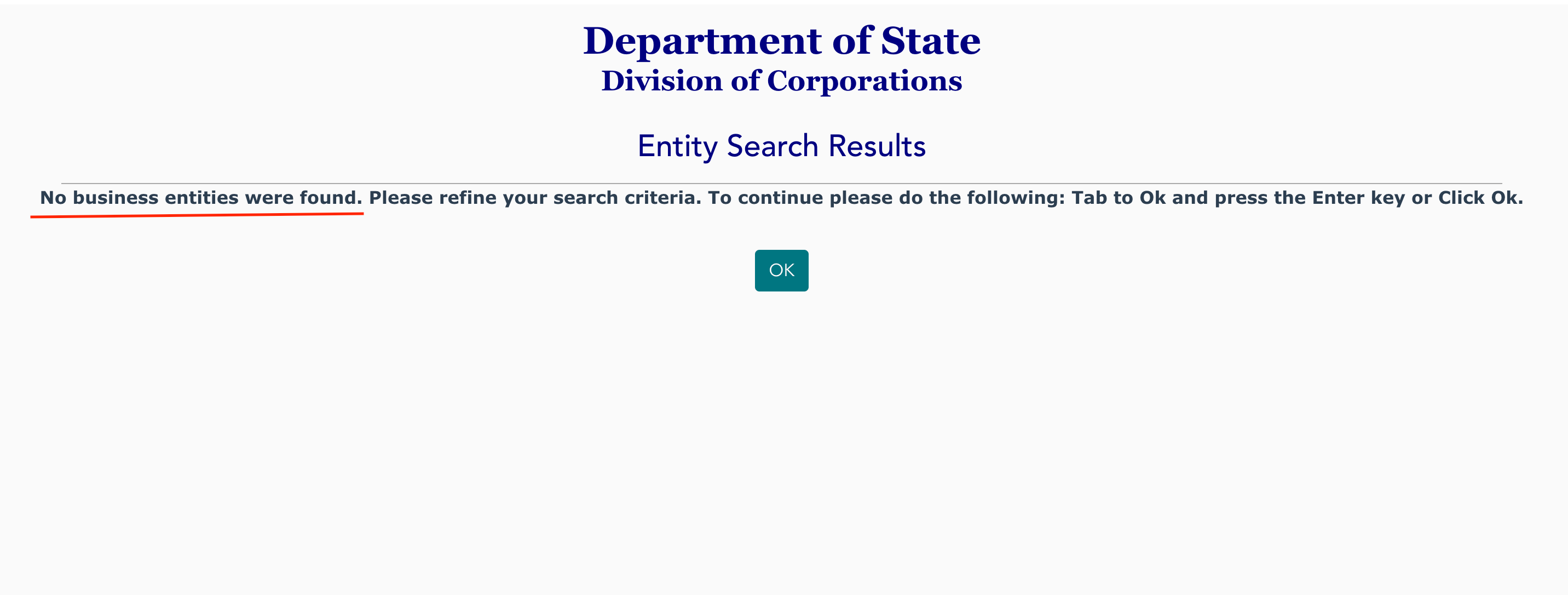
The invented phrase Hudson Lantern, with the same settings restored, produced a completed no-record result.
 Open full size
A longer phrase can remove the surrounding records from view. Keep the broader search with your notes so an empty result does not erase the similarities you already found.
The Department’s database guidance says this system should not determine whether an entity name is acceptable. Its Choosing a Name guidance explains the inquiry and reservation options and places the final determination at review and filing of the Articles of Organization.
Compare beyond LLCs, then prepare the full name
New York LLC Law § 204(b) requires distinguishability from specified LLC, corporation and limited-partnership names on the Department’s indexes, including covered fictitious and reserved names. This is the reason to examine more than the LLC category in the public search.
Section 204(a) requires Limited Liability Company, L.L.C. or LLC in the name. Prepare the complete spelling you intend to file, while keeping the distinctive wording you searched in your notes.
Section 204 also contains prohibited wording and conditions requiring other approvals. Read the applicable provision before using a restricted term; the examples shown in the search screenshots do not test those requirements.
Keep the reservation certificate for the next filing
If you need a hold before filing, the Department’s LLC name reservation application carries a $20 filing fee and reserves the name for 60 days. The Department issues a Certificate of Reservation.
Section 205 permits up to two additional periods of no more than 60 days each. The extension request must be filed before the current period expires; the Department lists a separate $20 fee for each extension.
A reservation does not waive the naming restrictions in § 204. Keep the Certificate of Reservation: it accompanies an extension request and the formation or authority document to which the reservation applies.
Official New York references
- DOS Public Inquiry: controls, result limit and completed searches observed and captured October 1, 2026.
- Database scope and instructions: search coverage and name-acceptability limit.
- Choosing a Name: preliminary inquiry and final filing review.
- LLC Law § 204: name form and comparison scope.
- LLC Law § 205 and DOS reservation instructions: hold period, fees, extensions and certificate. Sources checked October 1, 2026.